
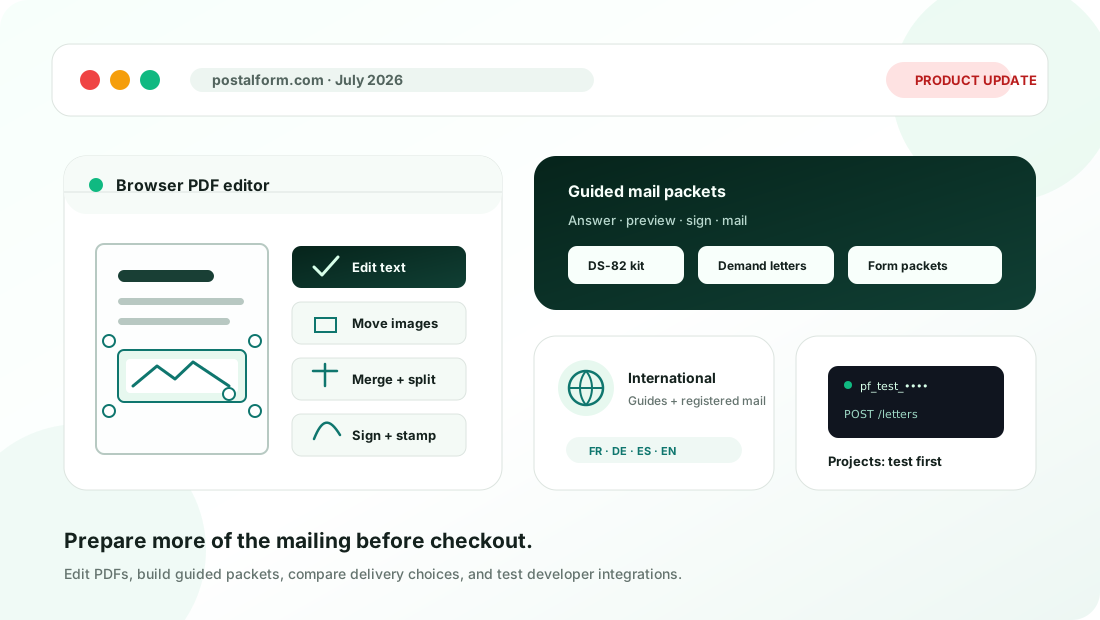
July was a building month across both sides of PostalForm: the one-off mailing experience at postalform.com and the developer platform at PostalForm Projects.
The common thread was preparation. Customers gained more ways to turn unfinished paperwork into a reviewable PDF, while developers gained a clearer path from a free test workspace to a live mailing integration.
Edit and organize PDFs in the browser
PostalForm added a free, browser-based PDF editor for the document work that often happens immediately before mailing.
The editor can:
- Replace text while preserving the surrounding style.
- Move and resize existing images.
- Add images, stamps, and signatures.
- Merge documents and split them again at visible document breaks.
- Zoom in and out while reviewing the page.
The editor also connects to the PDF merge tool, so a combined packet can move directly into editing before it is downloaded or mailed. The editing happens in the browser, and the final result remains reviewable before it enters checkout.
A complete DS-82 passport renewal kit
The new DS-82 Passport Renewal Kit turns a mail-in passport renewal into a guided sequence instead of a scavenger hunt.
It starts with a six-question eligibility check. Eligible customers can then prepare a filled official DS-82, exact government-fee check instructions, a passport-photo checklist, and a prepaid tracked USPS label to the correct processing lockbox. The completed form is shown before payment, and the kit keeps the separate State Department fee and PostalForm service price explicit.
The workflow also adds routing for routine and expedited applications, along with tracking emails for USPS acceptance and delivery to the processing center. PostalForm prepares the paper kit; the applicant still prints, signs, adds the required photo, passport, and government payment, and mails the envelope.
More guided forms and evidence packets
The PostalForm forms catalog grew well beyond single-page forms in July.
New guided packet builders covered:
- Bankruptcy, court, family-court, and probate correspondence.
- Completed tax-return print-and-sign kits.
- Landlord repair requests, refund requests, and cease-and-desist or no-contact requests.
- A recent solar-contract cancellation workflow with a required Certified Mail path.
- A mortgage payment and escrow error packet with a signed letter, timeline, and supporting records.
PostalForm also published or rebuilt guided paths for commonly mailed IRS, Social Security, Medicare, USPS, USCIS, VA, and state forms. Address fields became role-aware, which means a workflow can distinguish the sender, recipient, business, property, employer, or other address instead of treating every address as interchangeable.
For people still deciding what to send, new landlord notice and demand letter hubs added state-by-state guidance, decision finders, and clearer handoffs into the relevant mailing workflow.
Clearer choices before checkout
Mailing estimates and add-ons became easier to understand in July.
- Canada gained a Registered Mail option across the customer and developer order paths.
- Expedited delivery and signature choices became clearer for eligible orders.
- Delivery-date estimates began accounting for provider cutoff times and postal calendars more consistently.
- The public mailing cost calculator was updated for the July 2026 USPS rates and can compare do-it-yourself postage with PostalForm’s print-and-mail total.
- Manual address entry became a delayed fallback when autocomplete cannot find the right result, instead of appearing as the first option.
The order and support surfaces also became more useful after payment. Customers can see clearer mailed and delivery-status language, open order-error details when something needs attention, submit an email-first support request, or use automated phone support with the six-digit order reference and recipient ZIP code.
PostalForm Projects got a real onboarding path
PostalForm Projects received a redesigned landing page, workspace console, onboarding flow, and developer documentation.
Developers can start without a card in free test mode, create simulated letters and postcards, inspect status timelines, and exercise signed webhooks before adding live credits. The dashboard now brings the practical setup work together: test and live API keys, one-time key rotation, PDF uploads, quotes, orders, webhook settings, prepaid credits, and account access through short-lived sign-in links.
The API documentation also expanded around idempotent order creation, webhook verification and retries, international addressing, and the new Canada Registered Mail option. The result is a more direct progression from “can this integration work?” to a tested implementation with explicit control over when real mail and real spend begin.
International guidance in more languages
PostalForm added an international mailing hub with destination-specific guidance for the countries supported at the time. Alongside English guides, localized pages explain address formats, available service levels, document limits, and mail preparation in French, German, and Spanish.
These guides do not replace the final checkout quote. They make the important constraints visible earlier, while checkout still validates the actual PDF, sender, recipient, and selected service before payment.
July’s releases made PostalForm useful earlier in the mailing process: while a document is still being edited, while a customer is working out which packet is appropriate, or while a developer is proving an integration in test mode.